Two Ways to Build Faster
Get Into the Editor Faster
Paste a cURL command and Voiden builds the request for you. Need something you've already built? Import blocks from any .void file.
Paste cURL and Go
You don't need to build a request from scratch every time. If you've got a cURL command sitting in your terminal, browser devtools, or API docs, just paste it straight into a .void file and Voiden takes care of the rest.
No buttons to click. No forms to fill. Just paste and go.
How to Do It
- Open any
.voidfile in Voiden - Got your cURL command ready? Just paste it straight in with Cmd + V (macOS) or Ctrl + V (Windows/Linux), right into the
.voidfile, no special setup needed - That's it! Voiden recognises the cURL, figures out what you need, and builds all the blocks for you, endpoint, headers, body and all
Here's an example of what you might paste:
curl -X POST https://api.example.com/users \
  -H "Content-Type: application/json" \
  -H "Authorization: Bearer my-token" \
  -d '{"name": "Alice", "email": "alice@example.com"}'
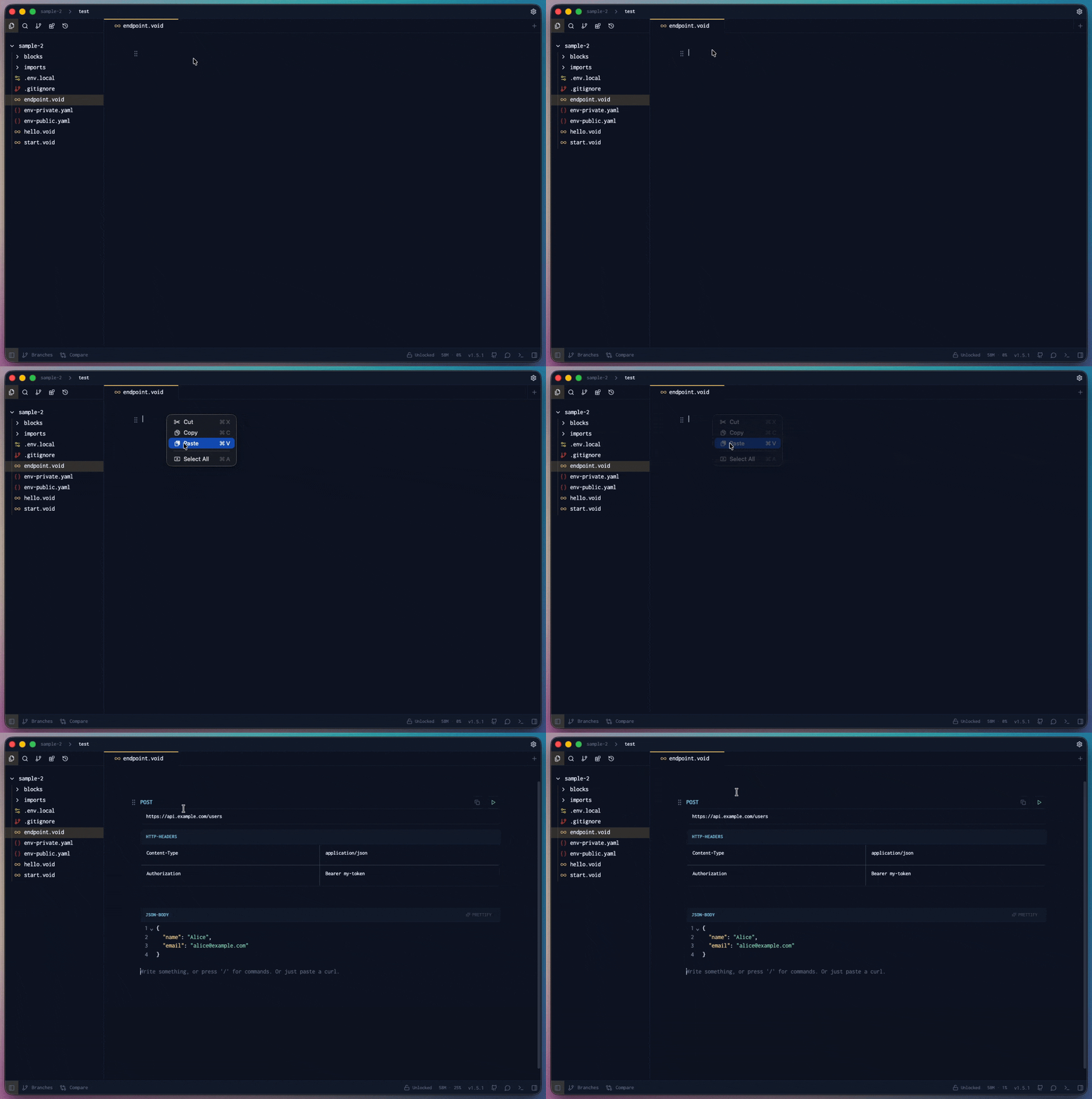
Voiden reads the whole thing and turns it into:
- Endpoint block
POST https://api.example.com/users - Headers block
Content-TypeandAuthorizationalready filled in - JSON body block the request body, formatted and ready to edit
Voiden Handles the Response Too
Blocks are ready, now just hit run. Voiden fires off the request and shows everything back in the Response Panel, nice and clear.
| What you see | Details |
|---|---|
| Status Code | The HTTP status returned by the server |
| Headers | All response headers |
| Body | The full response body, formatted and syntax-highlighted |
| Response Time | How long the request took to complete |
Hit run with:
- macOS
Cmd + Enter - Windows / Linux
Ctrl + Enter
The full flow is just: paste, run, read the response. That's it.
Supported cURL Flags
| Flag | What it does |
|---|---|
-X | Sets the HTTP method |
-H | Adds a request header |
-d / --data | Sets the request body |
--data-raw | Sets raw body content |
-u | Sets basic auth credentials |
Grab Blocks from Another .void File
Already built a request somewhere else and want to reuse it? No need to rebuild it, just use Import Blocks to grab what you need from any other .void file in your project and drop it right in.
The quickest way to do it is by typing @ in the editor. It opens up a file picker so you can find your .void file and pick the blocks you want, all without leaving the editor.
Want to dive deeper into how block reuse works? Jump to Reusable Blocks
Summary
If you've got a cURL command, paste it in and Voiden does the heavy lifting, builds the blocks, sends the request, and shows you the response. Already have blocks in another file? Just import them and you're good to go. Either way, you're up and running in seconds.