AI Skill in Voiden
Your AI assistant is great at writing code but it doesn't know Voiden's .void format out of the box. This is why we have added an AI Skill that fixes that. Enable it once from your settings, and your AI assistant will know everything it needs to write, edit, and generate valid .void files together with you.
How It Works
When you enable AI Skill, Voiden generates a skill.md file inside your project's .voiden directory, right where your assistant can find it:
| Assistant | Skill file location |
|---|---|
| Claude | .claude/skills/voiden/skill.md |
| Codex | .codex/skills/voiden/skill.md |
The file covers the full .void format: block types, structure rules, variable syntax, and the features from your enabled plugins. Your assistant picks it up automatically as context, so it can read your existing files and generate new ones correctly when required.
Enabling AI Skill
Head to Settings → AI Skill and toggle on the assistant(s) you use:
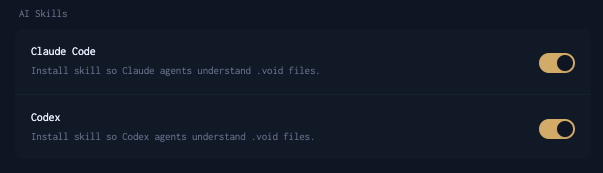
- Claude — Generates a skill file for Claude.
- Codex — Generates a skill file for Codex-based assistants.
You can enable both at the same time. In this case, each will get their own file.
Whenever you enable or disable a plugin, come back here and regenerate the skill file so your assistant stays in sync with your current setup.
This toggle only ever writes the skill file above — it teaches your assistant the .void format, nothing more. It doesn't register any MCP server and doesn't touch .mcp.json or ~/.codex/config.toml.
Earlier versions of Voiden also registered @voiden/mcp-server as a side effect of this toggle. That's no longer the case — registering the MCP server (so your assistant can actually execute .void requests, not just write them) is now a separate, explicit action. See Enabling MCP Execution below.
Enabling MCP Execution
Writing valid .void requests and running them for real are two different capabilities. This toggle covers the first. For the second — letting your assistant list, execute, and record .void requests — use the Initialize MCP button in the status bar instead, scoped to whichever project you currently have open. See Initialize MCP for what it registers and what it gives your assistant.
Clicking it also refreshes the authoring skill from How It Works above — but not a dedicated skill walking through how to use the MCP tools. Your assistant picks that up from each tool's own description instead.
If you also have this page's toggle enabled for that assistant, the dedicated walkthrough skill is already installed too, from that toggle:
| Assistant | MCP walkthrough skill location |
|---|---|
| Claude | ~/.claude/skills/voiden-mcp/SKILL.md |
| Codex | ~/.codex/skills/voiden-mcp/SKILL.md |
.mcp.json contains an absolute path specific to your machine. Voiden adds it
to your project's .gitignore automatically the first time it's written, so
it never gets committed.
What the Skill File Includes
The skill file is built from two layers, so your assistant only learns what's actually relevant to your project:
Core — Always Included
These fundamentals are always present, no matter what plugins you have enabled:
.voidfile format — frontmatter fields, block structure, UUID rules, variable syntax- Environment variables —
{{VARIABLE_NAME}}syntax and.envfile usage - File naming conventions — kebab-case naming, folder structure by resource
Plugins — Included When Enabled
Each plugin adds its own block types and syntax. Only what's enabled in your project gets included:
| Plugin | Blocks added to skill file |
|---|---|
| Voiden REST API | request, method, url, headers-table, query-table, path-table, json_body, xml_body, yml_body, text_body, multipart-table, url-table |
| Voiden GraphQL | gqlquery, gqlvariables |
| Simple Assertions | assertions-table with all operators and field path syntax |
| Advanced Authentication | auth block with all auth types: bearer, basic, apiKey, oauth2, oauth1, digest, awsSignature, ntlm, hawk, netrc |
| Voiden Scripting | pre_script, post_script, full vd API reference |
| Voiden Faker | {{$faker.*()}} syntax with all available categories and methods |
| Voiden MCP Client | mcp-connection, mcpoperation, mcp-response |
| Voiden Tool | tool, toolparams, toolverifies |
Example Usage
Once the skill file is in place, your assistant knows exactly how Voiden works. Try asking things like:
- "Create a POST request to
/api/userswith a JSON body and Bearer auth" - "Add assertions to check the status is 200 and
body.idexists" - "Write a pre-script that reads
USER_IDfrom variables and sets it as a header" - "Generate a request body using faker for name, email, and UUID"
It will produce valid .void blocks — correct format, correct block types, correct syntax — ready to drop straight into your file.
The skill.md file is auto-generated by Voiden. Don't edit it manually — any changes will be overwritten the next time it's regenerated.
Summary
AI Skill generates a skill.md file that teaches your AI assistant (Claude or Codex) the .void file format — covering core blocks, variable syntax, and whichever plugin features you have enabled. Enable it from Settings → AI Skill, and your assistant can generate valid .void blocks on request. Regenerate the file after changing plugins to keep it up to date. To let your assistant actually execute requests, use the status bar's Initialize MCP button instead — a separate, per-project action.