Vault Secrets
Author: Phurpa Tsering | Version: 1.1.1 | Repository: phurpa-tsering/voiden-vault-secrets
Use secrets from your secret manager in Voiden requests without storing them in your project.
Authorization: Bearer {{vault.myapp/api#token}}
X-Api-Key: {{doppler.API_KEY}}
Voiden reads each secret when you send the request. The value never reaches your .void files, the editor, or Git.
| Provider | Reference | Connects through |
|---|---|---|
| HashiCorp Vault | {{vault.path#field}} | Vault HTTP API (KV v1 / v2) |
| Doppler | {{doppler.NAME}} | Doppler API |
| Infisical | {{infisical.NAME}} | Infisical API (cloud or self-hosted) |
| Bitwarden | {{bitwarden.Item#field}} | bw serve, the Bitwarden CLI's local API |
| KeePassXC | {{keepass.Group/Entry#attr}} | keepassxc-cli and your .kdbx file |
Requires a Voiden version with the plugin variable provider API (
env.registerVariableProvider). On older versions the plugin still loads, but references stay unresolved and the settings page shows a warning.
Setup
Install the plugin from Extensions (or Extensions → ⋯ → Install from file → voiden-vault-secrets.zip), then click the key icon in the top bar.
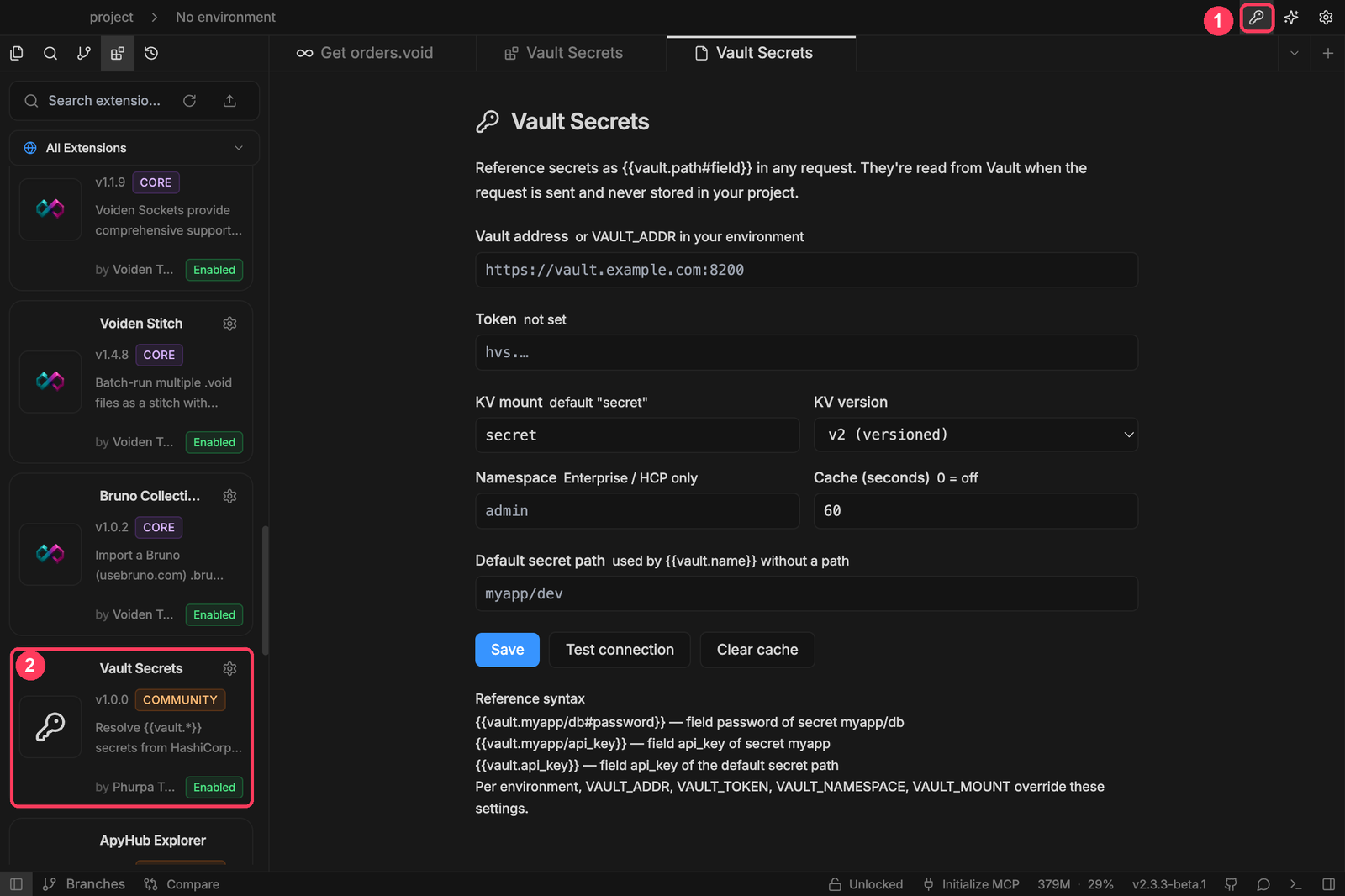
The settings page lists every provider on the left, with its status:
| Dot | Meaning |
|---|---|
| ○ hollow | Not set up yet |
| ● blue | Set up, not tested yet |
| ● green | The last test or request read secrets successfully |
| ● red | The last test or request failed (hover for the reason) |
Each provider has three tabs:
- Connection: fill in the form and click Save (or press ⌘S / Ctrl+S). Saving tests the connection automatically, and Test connection checks what's in the form before you save. Secrets (tokens, client secrets, database passwords) show as Saved · encrypted and are never displayed again. Use Replace or Remove to change them.
- Browse secrets: search what the provider holds and click a field to copy its reference. Only names are shown, never values.
- How to use: setup steps, reference syntax and environment overrides for that provider.
The Cache box in the header sets how long a secret is reused before it's fetched again (60 s by default, 0 turns caching off). Clear forgets every cached secret, for example right after you rotate one.
HashiCorp Vault
| Setting | Default | |
|---|---|---|
| Vault address | — | Must start with http:// or https://. |
| Token | — | Needs read on the secrets you reference. |
| KV mount | secret | Where your KV engine is mounted. |
| KV version | v2 | v1 is supported too. |
| Namespace | — | Vault Enterprise / HCP only. |
| Default secret path | — | Used by bare references like {{vault.api_key}}. |
A minimal policy for a token that reads everything under secret/myapp/ on a KV v2 mount (add list on secret/metadata/* to use Browse secrets):
path "secret/data/myapp/*" {
  capabilities = ["read"]
}
| Reference | Reads |
|---|---|
{{vault.myapp/db#password}} | field password of secret myapp/db |
{{vault.myapp/api_key}} | field api_key of secret myapp |
{{vault.api_key}} | field api_key of the default secret path |
# always marks the field. Without it, the last path segment is the field. A field that isn't plain text (a number, a list, an object) is sent as JSON.
Doppler
Generate a read-only service token for a config (config → Access → Generate) and paste it in. A service token is scoped to one config, so project and config can stay empty. With a personal token, set both.
| Reference | Reads |
|---|---|
{{doppler.API_KEY}} | API_KEY from the configured project and config |
{{doppler.prd/API_KEY}} | API_KEY from config prd of the configured project |
{{doppler.backend/prd/API_KEY}} | API_KEY from project backend, config prd |
The whole config is fetched in one call (GET /v3/configs/config/secrets/download) and cached.
Infisical
Create a machine identity with Universal Auth, give it read access to the project, and enter its client ID and client secret, the project ID and the environment slug. An access token works too (choose Access token under Authentication). For EU cloud or self-hosted Infisical, change the URL.
| Reference | Reads |
|---|---|
{{infisical.API_KEY}} | API_KEY in the default folder |
{{infisical.payments/STRIPE_KEY}} | STRIPE_KEY in folder /payments |
{{infisical./API_KEY}} | API_KEY in the root folder, when the default folder is elsewhere |
Secret references and imports are expanded. Set INFISICAL_ENVIRONMENT in each Voiden environment to map it to an Infisical environment.
Bitwarden
Bitwarden's password manager encrypts your vault locally, so the plugin talks to the official Bitwarden CLI running on your machine:
bw login                 # once
bw serve --port 8087     # keep it running
Then unlock it from the Connection tab: when the vault is locked, the test result shows a master password box. The password goes to your local bw serve only and is never stored. Sync pulls new items from the server, and Lock locks the vault again.
| Reference | Reads |
|---|---|
{{bitwarden.GitHub}} | password of the item named GitHub |
{{bitwarden.GitHub#username}} | its username (also totp, notes, uri, and card number / code) |
{{bitwarden.Stripe#api_key}} | custom field api_key of item Stripe |
{{bitwarden.<item id>#password}} | by id, when several items share a name |
Names match exactly, then case-insensitively. TOTP codes are fetched fresh every time.
bw servehas no authentication of its own, so anything running as your user can read an unlocked vault through it. Bind it to localhost (the default) and lock it when you're done.
KeePassXC
Install KeePassXC, which ships keepassxc-cli. Choose your .kdbx file and enter its password, a key file, or both. The CLI is found in the standard install locations. If yours is elsewhere, set its path.
| Reference | Reads |
|---|---|
{{keepass.Dev/GitHub}} | password of entry GitHub in group Dev |
{{keepass.Dev/GitHub#UserName}} | its username (also URL, Notes, TOTP, or any custom attribute) |
The database password is passed to keepassxc-cli on stdin, never on the command line. Each uncached read opens the database, which takes about a second with a strong KDF, so leave caching on.
Use secrets in requests
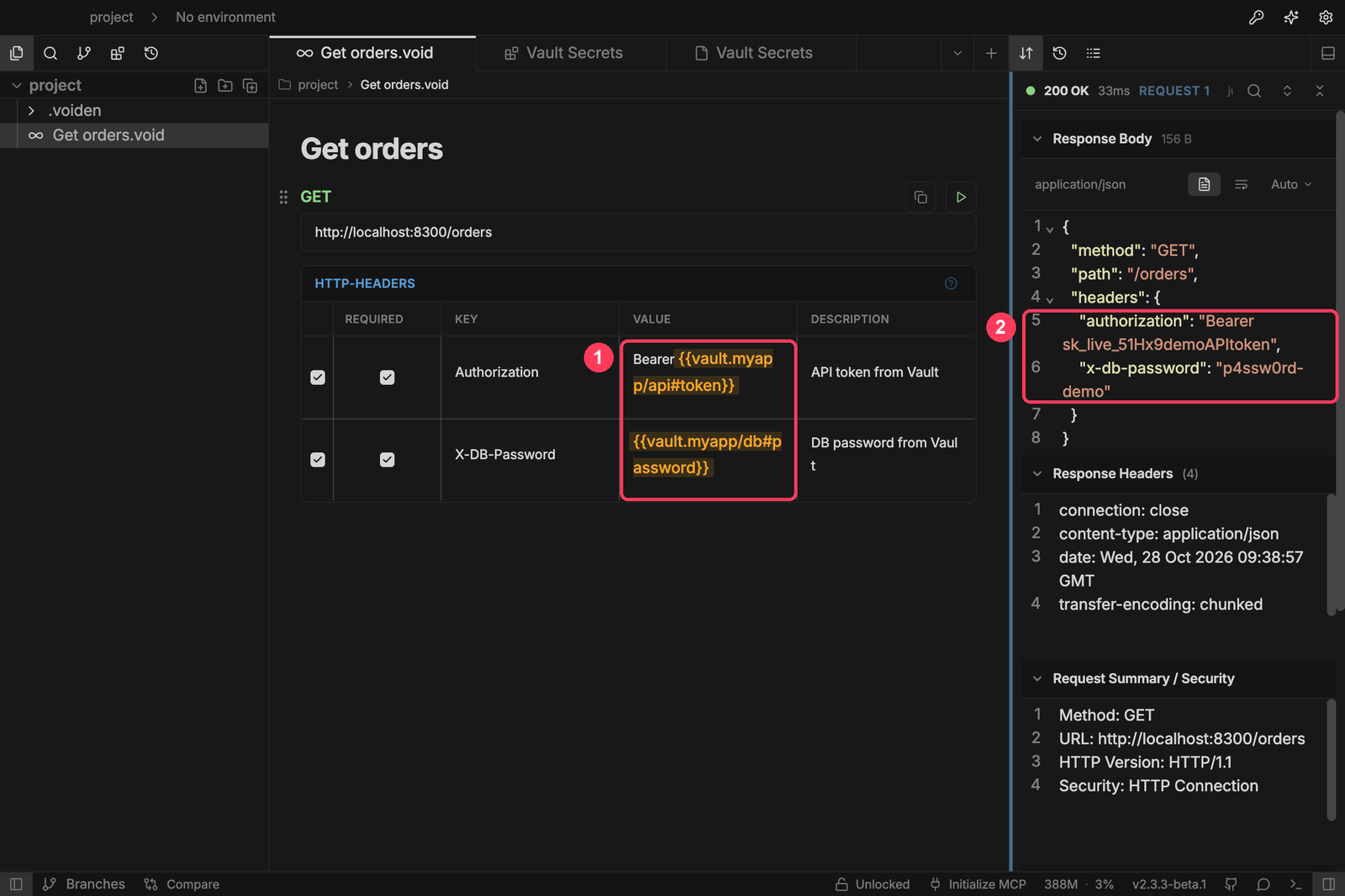
Type a reference anywhere you'd use a variable: URL, headers, query, body. Secret references are highlighted in amber ①, so you can tell them apart from environment variables.
When you send the request, Voiden fills in the real values. Here the echo API sends back what it received ②.
When a secret can't be read
If Voiden can't read a secret, it doesn't send the request: nothing ever goes out with a placeholder in it. The response panel reports an unresolved variable ①, and a toast explains exactly what went wrong ②.
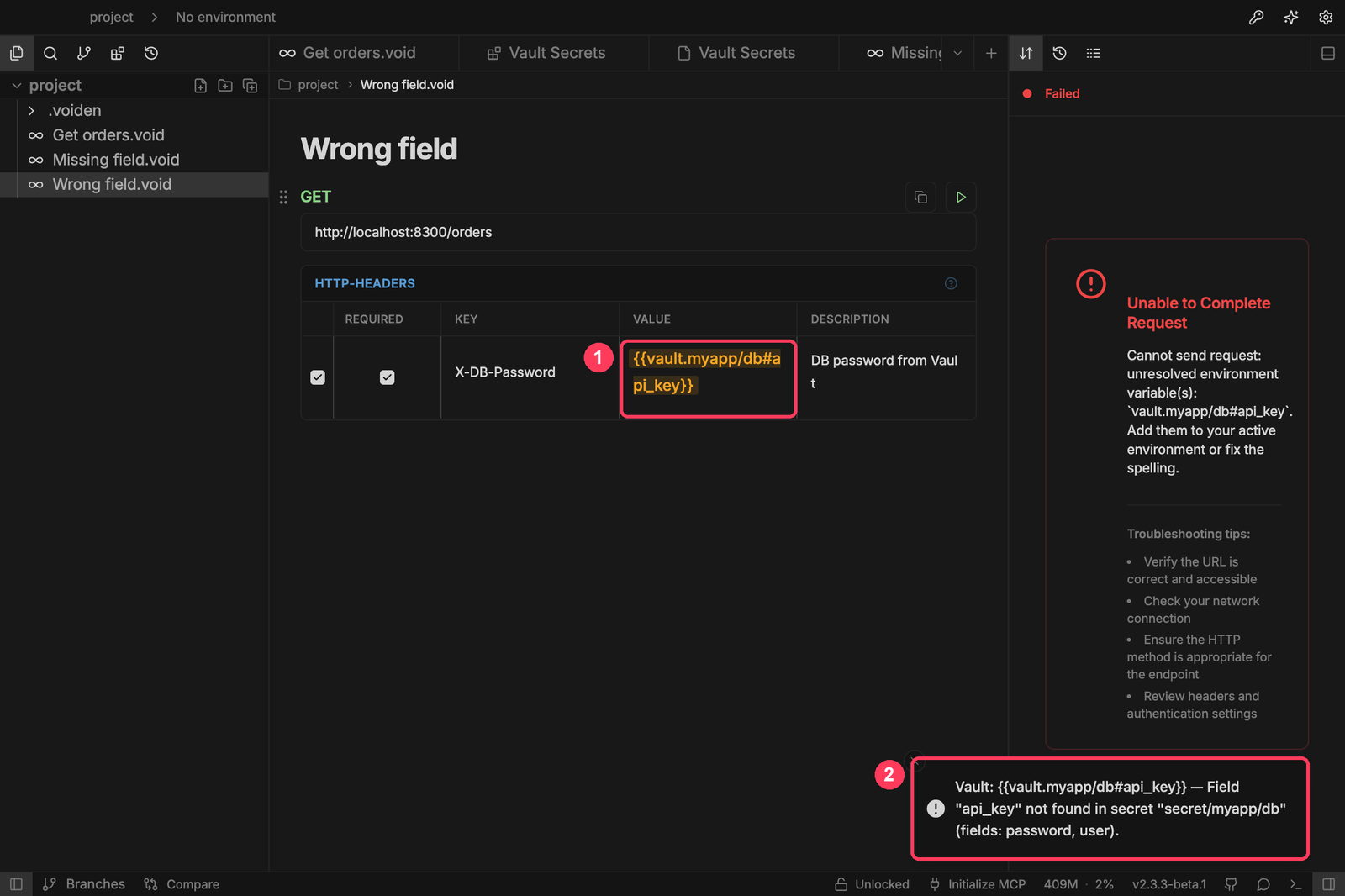
Every message says what to fix: a missing field lists the fields that do exist, a wrong token says the token was rejected, a locked Bitwarden says to unlock it, and so on. A provider that isn't set up names the setting that's missing and the environment variable that could supply it.
A different setup per environment
Variables in the active Voiden environment override the saved settings:
| Provider | Variables |
|---|---|
| HashiCorp Vault | VAULT_ADDR, VAULT_TOKEN, VAULT_NAMESPACE, VAULT_MOUNT |
| Doppler | DOPPLER_TOKEN, DOPPLER_PROJECT, DOPPLER_CONFIG |
| Infisical | INFISICAL_API_URL, INFISICAL_UNIVERSAL_AUTH_CLIENT_ID, INFISICAL_UNIVERSAL_AUTH_CLIENT_SECRET, INFISICAL_TOKEN, INFISICAL_PROJECT_ID, INFISICAL_ENVIRONMENT, INFISICAL_SECRET_PATH |
| Bitwarden | BW_SERVE_URL |
| KeePassXC | KEEPASS_PASSWORD |
For example, staging can read from a different Vault, Doppler config or Infisical environment than dev. Keep credentials in a private environment, never a public one, because public environments are committed to Git.
Test connection and Browse secrets use the settings page's values, not environment overrides.
How it works
- Secrets are read in Voiden's main process. Each provider is a variable provider that runs there, so secret values never pass through the editor or the renderer. The secret browser only ever receives names.
- Credentials are encrypted with your OS keychain (macOS Keychain, Windows DPAPI, libsecret on Linux) and saved in Voiden's user data folder (
plugin-data/voiden-vault-secrets/config.json, readable only by you). If OS encryption isn't available, they're kept in memory until Voiden quits and are never written to disk in plain text. Settings from 1.0.x are migrated automatically. - Secrets are cached in memory, 60 s by default, so several references to one secret, or a run of requests, read it once. The cache is keyed by provider and every connection setting, credentials included, so switching tokens never serves another token's secrets. Failed reads and TOTP codes are never cached.
Development
npm install
npm test          # unit tests (providers run against fake HTTP / CLI responses)
npm run build     # dist/voiden-vault-secrets.js + dist/voiden-vault-secrets-main.cjs
npm run zip       # dist/voiden-vault-secrets.zip
To develop it live, open this folder as a project in Voiden, turn on Plugin Dev Mode (puzzle icon), and press Run.
| File | |
|---|---|
src/catalog.ts | The providers and their settings. Shared by the main process and the settings page, whose forms are generated from it. |
src/main-process.ts | Registers one variable provider per namespace, plus the settings IPC handlers. |
src/service.ts | Merges settings, drafts and environment overrides, checks required fields, caches and tracks status. |
src/providers/*.ts | One client per secret manager: resolve, test, browse. |
src/configStore.ts, src/configModel.ts | Settings, encrypted credentials, migration from 1.0.x. |
src/plugin.ts, src/SettingsPage.tsx, src/ui/ | Top-bar button, settings tab, reference highlighting, error toasts. |
Roadmap
- More Vault auth methods (AppRole, OIDC)
- Bitwarden Secrets Manager (
bws) - KeePassXC through its browser-integration socket, so an unlocked KeePassXC needs no stored password
License
Apache-2.0