Tool Block
The Tool block (/tool) marks an existing request as a named, agent-callable tool. Instead of an AI agent only seeing generic tools, it sees create_user, refund_order, search_products — whatever you name it. Think of it as a label you attach to a request that tells an AI agent: "this exists, here's what it does, and here's exactly how to call it safely."
A /tool block doesn't build a request of its own — it decorates one that already exists elsewhere in the file. By default that's the request in the same section, but you can point it at a request in a different section, or even a different .void file, using the Request row at the top of the block ("bind a different request…").
To actually serve a tool to an agent, see Publishing with @voiden/mcp.
Adding a Tool
- Put your cursor in the same section as the request you want to expose.
- Type
/tooland press Enter. - Fill in the identity fields:
| Field | What it's for |
|---|---|
| Name | The function name an agent calls, e.g. create_user. Must be unique across every tool you publish. |
| Title | A human-readable label. |
| Description | What the tool does. This is what an agent reads to decide whether to call it. |
| Annotations | Four hints about the tool's behavior — see below. |
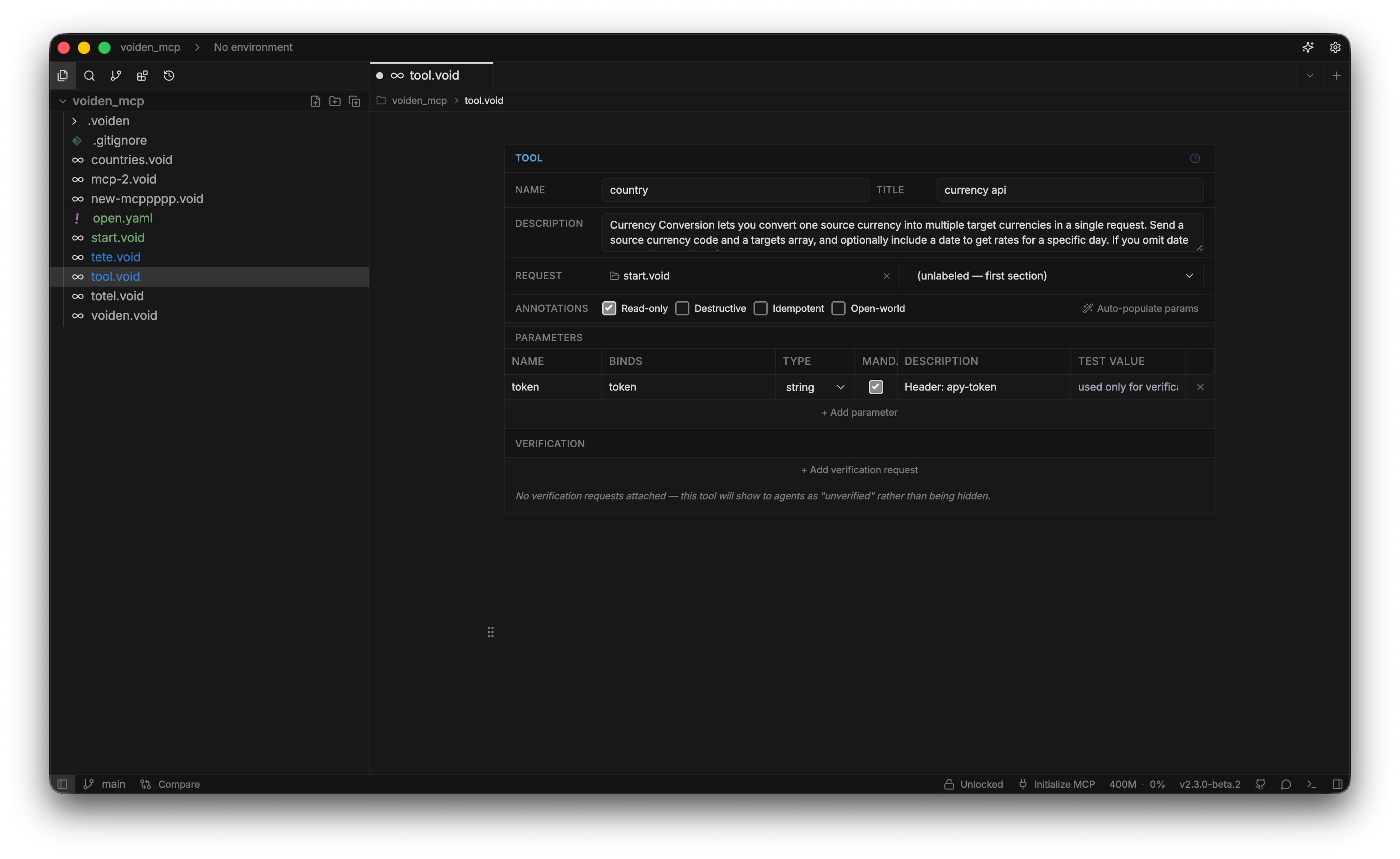
Annotations — standard MCP hints for the calling agent:
| Annotation | Meaning |
|---|---|
| Read-only | Never mutates anything. The only one Voiden checks — a read-only tool whose request is POST/PUT/PATCH/DELETE gets excluded from publishing. |
| Destructive | May cause irreversible changes (e.g. deleting a record). |
| Idempotent | Calling it again with the same arguments has no extra effect. |
| Open-world | Talks to an open-ended domain (a live web search) rather than a fixed one (your own database). |
Other than Read-only, these are just hints for the agent — Voiden doesn't enforce them.
There's also an underlying enabled setting on the block itself (on by default) that, when turned off, force-removes a tool from what's served no matter what verification says about it — a way to pull a tool without deleting the block. The editor doesn't currently expose a switch for it directly on the block.
Parameters
A {{token}} is Voiden's placeholder syntax — e.g. {{userId}} written into a URL or a request body, filled in at call time. Every row in the Parameters table declares one such placeholder that the agent fills in on every call — there's no separate "just resolve this quietly from my environment" kind of param; if the request uses a placeholder, it needs a row here.
| Field | What it's for |
|---|---|
| Name | The input name the agent sees. |
| Binds | Which {{token}} in the request receives the value. |
| Type | string, number, integer, boolean, object, or array. |
| Mand. | Whether the agent must supply it. |
| Description | Shown to the agent. |
| Test value | Fills the {{token}} in place of a real agent call, for verification only. |
Don't want to add these rows one by one? Click Auto-populate params (top-right of the block) and Voiden scans the bound request for every {{token}} it uses and adds a row for each one it doesn't already have — with a sensible description guessed from the header/query/path row it came from, where possible. You still need to fill in the Test value yourself for verification to work.
- Without a Test value, verification can't exercise that param — the request fails on the unresolved token, same as any other missing substitution.
- Every
{{token}}the request actually uses currently needs a matching Binds row — even one you only ever want resolved from your environment, never touched by the agent. A token with no matching row excludes the tool from being served (unresolved-placeholder), regardless of whether it would have resolved fine as a normal environment variable at request time.
Verification
The Verification table proves a tool actually works before it's served — each row points at a request that tests it.
| Field | What it's for |
|---|---|
| Section label | Which request proves this tool works. |
| File (optional) | A different .void file, if the request lives elsewhere. |
| Role | happy-path, error-contract, or auth-check. A failing auth-check skips everything else. |
| Cadence | hourly, daily, weekly, or monthly — how often this re-runs once published. |
| Mode | live (runs for real), sandbox (label only, runs the same), or none (never runs automatically). |
| On failure | withdraw (default) or advertise-degraded — this row's own consequence if it fails. See below. |
On failure:
- Withdraw (default) — hide the tool entirely.
- Keep, flagged degraded — keep it visible, with a warning in its description.
"Proves it works" means: any assertions already on the request are checked, falling back to plain transport success (no error, no 4xx/5xx) if the request has none.
- When more than one row fails at once, the most conservative policy wins — a single
withdrawamong the failed rows withdraws the tool, even if every other row saysadvertise-degraded. - No verification rows at all? The tool still gets served, just marked unverified.
Try it Out
- Write a request — e.g.
POST /userswith a JSON body. - Place your cursor in that section and type
/tool. - Name it
create_user, write a clear description, and add a Parameters row for each{{token}}. - Add a Verification row pointing at a request that confirms the endpoint works.
- Run
voiden-mcp <path> --check(see Publishing with @voiden/mcp) to see it live — verified/unverified/failing, and whether it's currently served.
Summary
The Tool block turns a request into a named, typed tool — every parameter agent-supplied and declared up front, plus a verification policy deciding whether it's safe to serve. It never runs on its own; @voiden/mcp is what publishes it.