Environment Variables
Environment variables let you manage different configurations for various deployment environments (development, staging, production) without changing your code.
Setting Your Environment
The environment selector lives in the top navigation bar, right next to the recent project selector. Click it and a card pops up where you can pick the environment you want to work in — just click the one you need and Voiden switches over instantly.
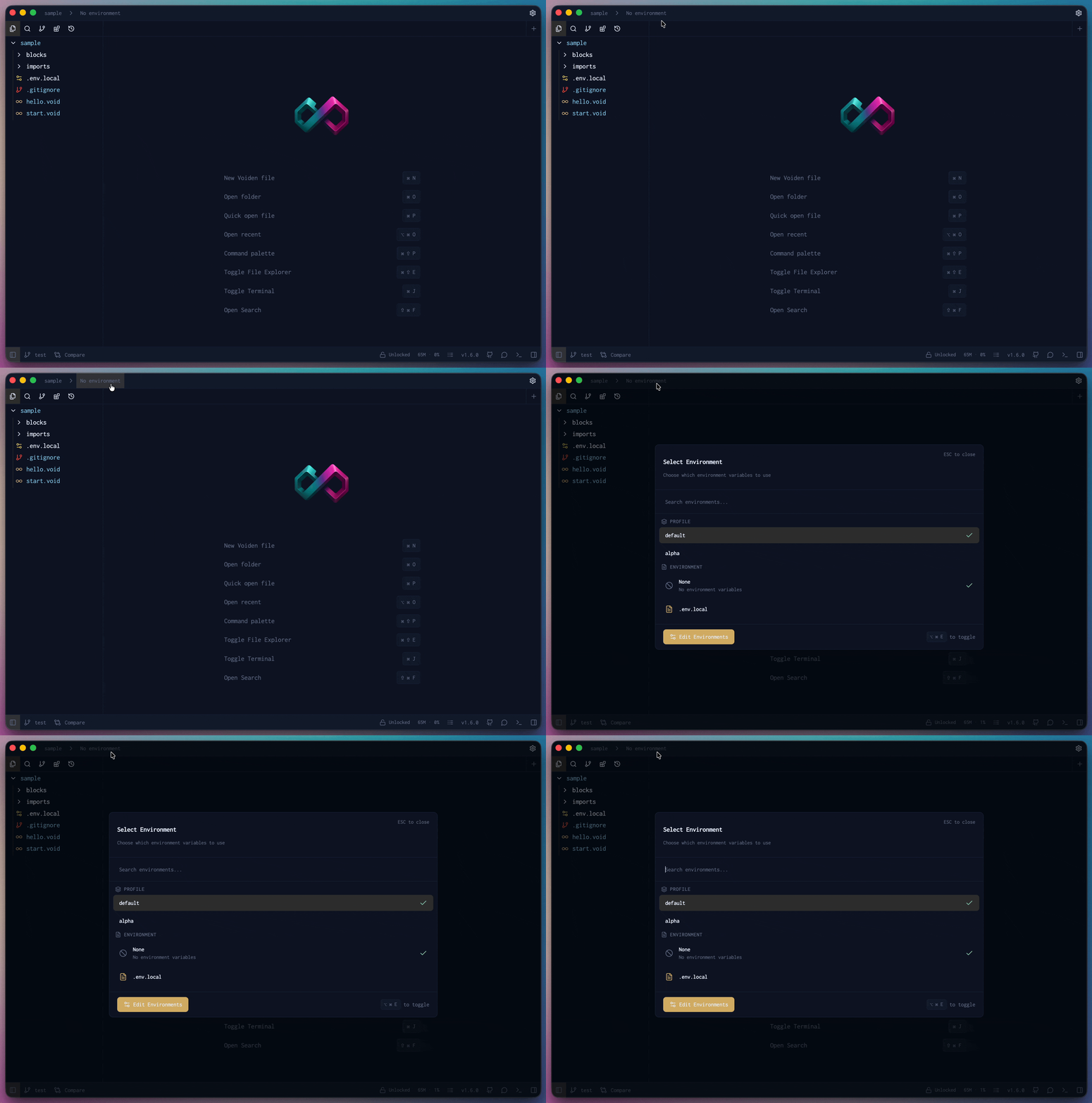
Check out Advanced Environment Configuration for the full system.
How Variables are Resolved
- Local variables always override environment variables
- Environment variables override default global variables
- This ensures you can have environment-specific values while still allowing local overrides for testing
Creating Environment Files
Environment files should always start with .env followed by the environment name. For example:
.env→ Global defaults shared across all environments.env.dev→ Development environment.env.staging→ Staging environment.env.prod→ Production environment
The base .env file acts as the global configuration, and environment-specific files override or extend these values.
Default Environment (.env)
API_BASE_URL=https://api.example.com
API_VERSION=v1
DB_HOST=localhost
Every variable in the environment panel shows a preview of its resolved value. Hover over any variable to reveal a copy button — click it to copy the value directly to your clipboard.
⌘ Cmd + Click on any environment variable to jump directly to its definition in the env file.
Benefits of Using Environment Variables
| Area | Key Benefits |
|---|---|
| Security | • Keep sensitive data out of codebase • Prevent accidental credential mixing • No hardcoded secrets |
| Developer Experience | • One-click environment switching • Personal local overrides • No manual configuration |
| Consistency | • Same base config for all teams • Identical structure across environments • Reduce "works on my machine" issues |
| Rapid Switching | • Test APIs in different environments • Compare staging vs production instantly • Validate environment features |
| Collaboration | • Share base files via Git • Keep overrides private • Different local configs without conflicts |
| Organization | • Clear environment separation • Easy to track variable changes • Simple to add new environments |
Summary
Once you get the hang of environment variables, managing different configurations across environments becomes second nature. Create your .env files, pick your environment from the selector in the top nav, and Voiden takes care of resolving the right values. Local overrides always win, so you can tweak things for your machine without affecting anyone else.