Runtime Variables
Need a variable that's not fixed but depends on another request's response? Runtime variables let you capture values from one API call and reuse them in subsequent requests.
What are Runtime Variables?
Runtime variables are dynamic values that get set during request execution. They're perfect for scenarios like:
- Capturing an auth token from login and using it in authenticated requests
- Storing a user ID from a create-user response
- Saving an order ID to use in later order management calls
Per-Environment Storage
Runtime variables are now stored per-environment rather than in a single global store. Depending on whether you have an environment active or not, things work a little differently.
Environment is Active
Runtime variables are scoped directly to the active environment. Any value set during a request stays tied to that environment and won't affect anything else. Switch to staging, and you're working with staging's variables. Switch to production, and it's a completely clean slate.
No Environment is Active
No environment selected? No problem. Runtime variables fall back to a global runtime so your workflow keeps running without any interruptions. Think of it as a safe default that's always there when you need it.
Which Value Wins?
If the same variable exists in both the active environment and the global runtime, the environment-specific value always takes priority. Global values are only used as a fallback when there's nothing more specific to pull from.
This means you can run the same workflow across dev, staging, and production without variables from one environment bleeding into another. Each environment keeps its own clean set of runtime state.
Creating Runtime Variables
Add a /runtime-variables block in your Voiden file:
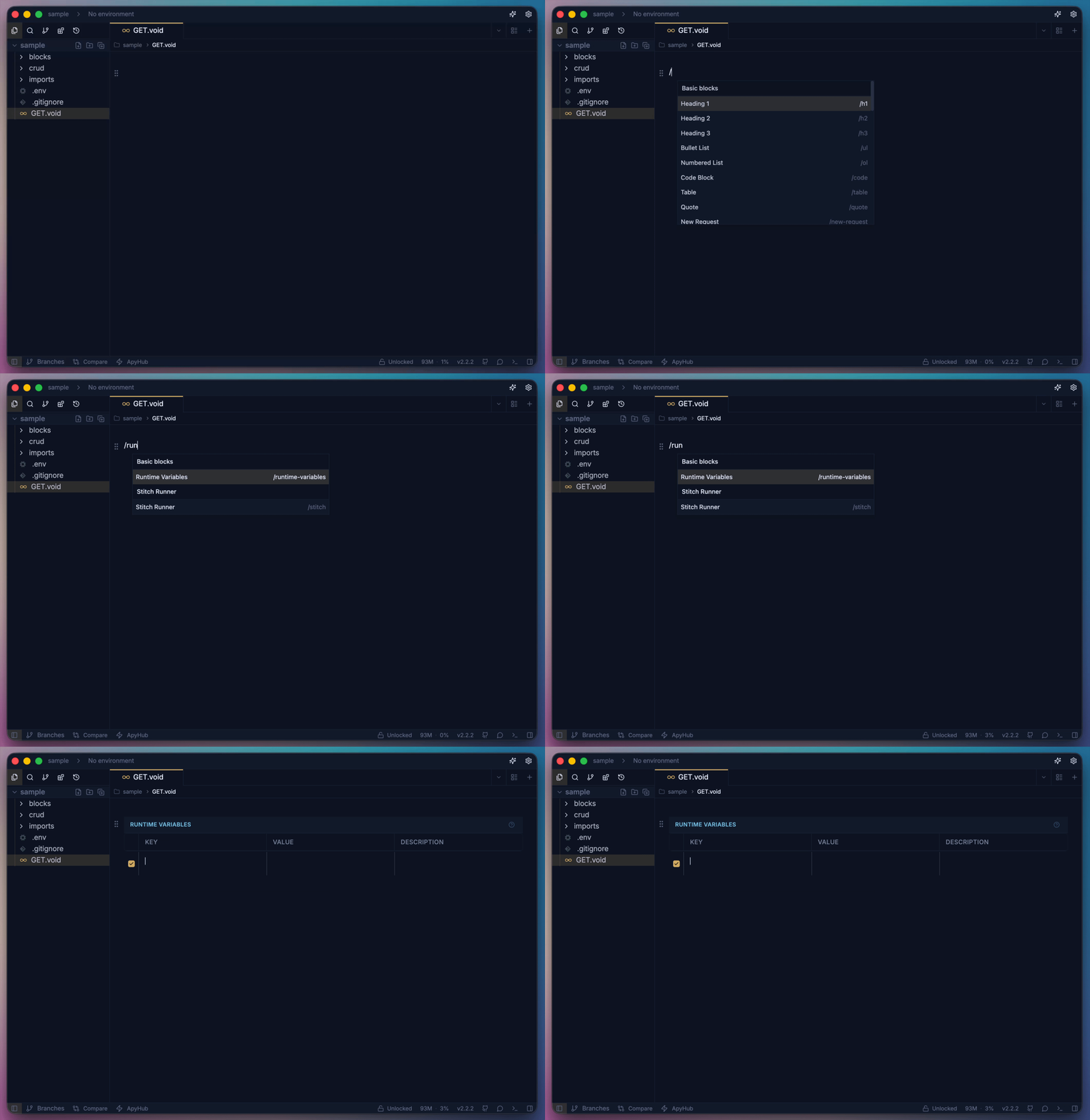
Available Data Sources
-
From Request ($req) Access data from the current request:
URL:
{{$req.url}}Headers:
{{$req.headers.Authorization}}Content Type:
{{$req.contentType}}Body:
{{$req.body.email}}Path Parameters:
{{$req.params.userId}}Query Parameters:
{{$req.query.page}} -
From Response ($res) Access data from the API response:
Status Code:
{{$res.status}}Response Body:
{{$res.body.data.user_id}}Headers:
{{$res.headers.x-rate-limit}}Content Type:
{{$res.contentType}}
Accessing Nested Data
Objects
Use dot notation to access nested properties:
user_email: "{{$res.body.user.contact.email}}"
api_version: "{{$res.body.meta.api.version}}"
Arrays Access array elements by index or let Voiden auto-select:
- Specific Index:
first_item: "{{$res.body.items[0].name}}"
third_user: "{{$res.body.users[2].id}}"
- Auto-select (first match):
  any_product: "{{$res.body.products.name}}"  # Gets first product's name
any_id: "{{$res.body.ids}}"                 # Gets first ID in array
Example Workflow
-
First request
In the first request, add the Runtime block and attach a data source for every variable. Here,
data_expose_oneis set to{{$res.body.headers.host}}— as soon as this request runs, thehostvalue from the response gets captured into that variable.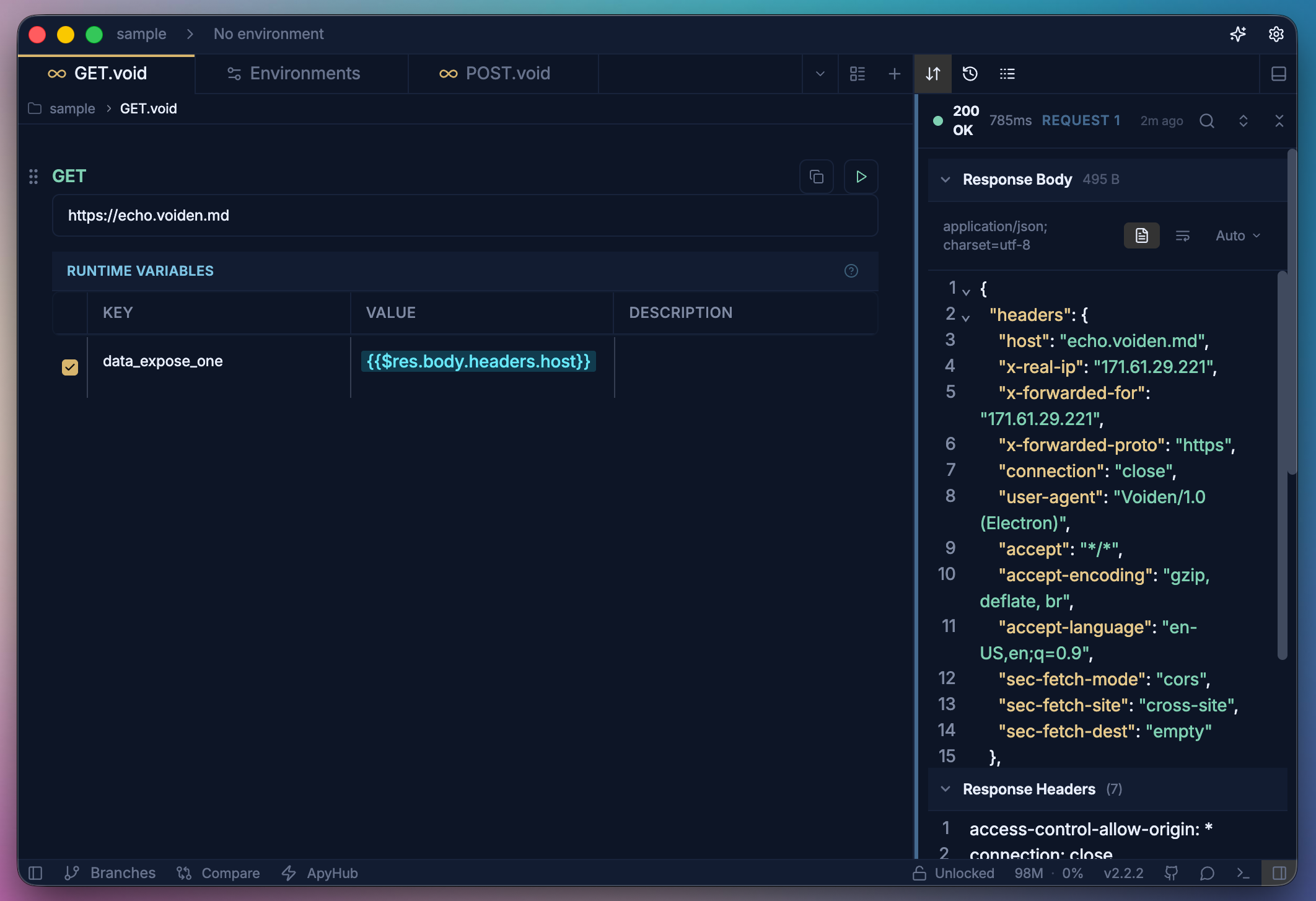
And run the request by either:
- Pressing Cmd + Enter (on macOS) or Ctrl + Enter (on Windows/Linux), or
- Clicking the bright green Play button in the toolbar.
-
Second request
Reference the captured variable anywhere using
process.<variable_name>. Here,{{process.data_expose_one}}pulls in thehostvalue that was captured in the first request — hovering over it shows the resolved value (echo.voiden.md) right there in the editor.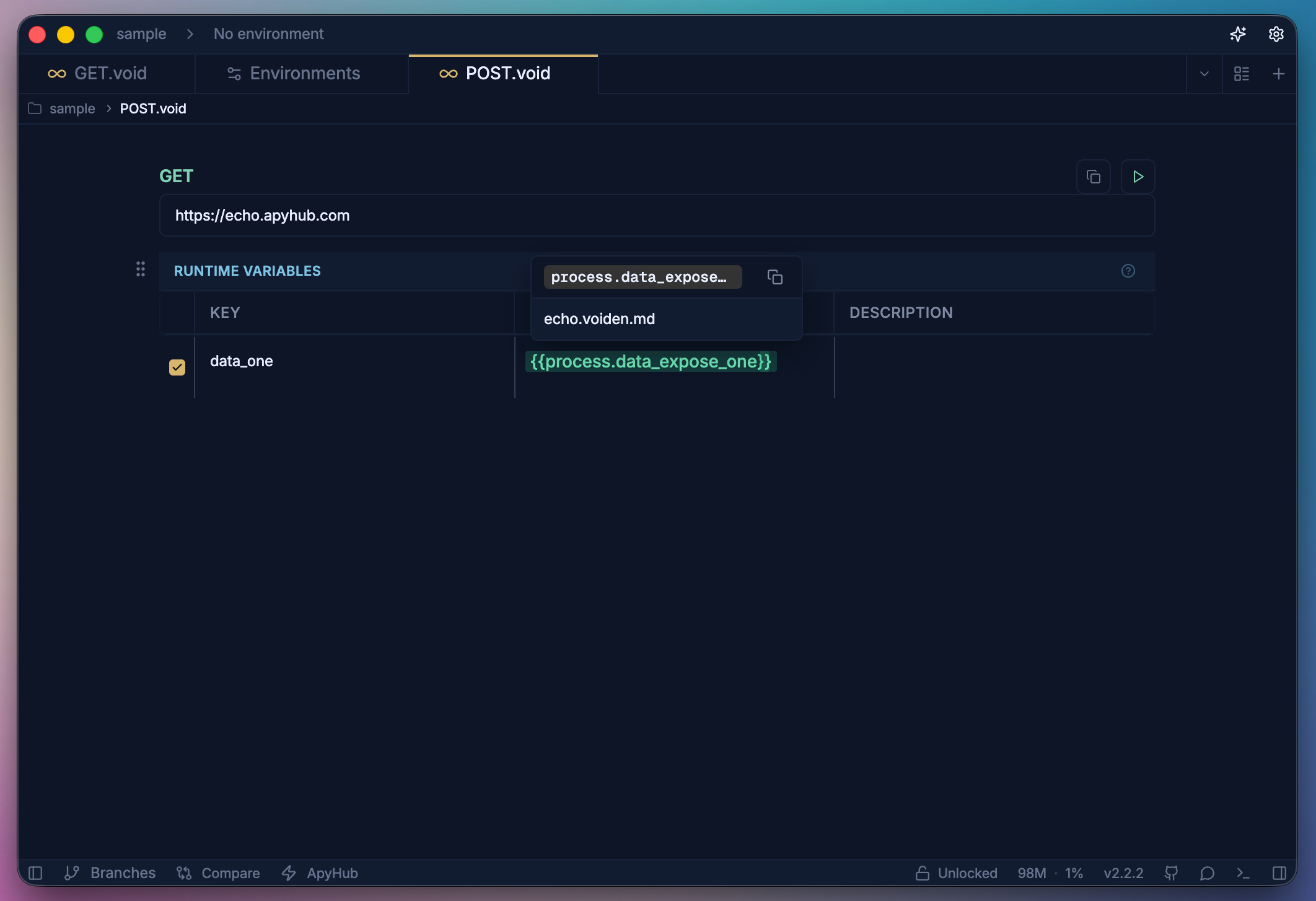
Best Practices
- Use descriptive names: session_token instead of token1
- Handle null cases: Ensure the data path exists before using it
- Test extraction: Verify runtime variables capture the expected values
- Chain carefully: Make sure dependent requests execute in the correct order
Every runtime variable shows a preview of its current resolved value. Hover over any variable to reveal a copy button — click it to copy the value directly to your clipboard.
Runtime variables transform your isolated API calls into connected workflows!
Summary
Runtime variables are what turn a bunch of separate requests into a real workflow. Capture a value from one response, pass it into the next request, and keep the chain going. They're scoped to whatever environment you're working in, so dev, staging, and production all stay completely separate. And if you're not using an environment, the global runtime has you covered. Set them up once and let Voiden do the rest.